

| Monday, September 7 | Labour Day (no classes) |
Tuesday, September 8 (Grade 9 and ‘New’ International students only) | Grade 9 Orientation Day ‘New’ International Students Orientation Day Parent/Guardian Q & A with the Principal |
Wednesday, September 9 (All grades) | First Day of Regular Classes (All Grades) Cafeteria Service Begins |
| September 14 | Photo Day School Council Elections 7:00 PM Library: The first School Council meeting is scheduled for Monday, September 14 at 7:00 PM in the Library. At this meeting we will be holding elections for positions on our Council. If you would like to run for a position please complete a School Council Nomination Form. You can get more information and access an electronic version of the nomination form here: School Councils. Please send the completed form to thornlea.ss@sc.yrdsb.ca by Friday, September 11 or bring it to the meeting on September 14. |
Mental Health over the Summer
Our mental health team has put together a Summer Wellness Guide in partnership with student leaders. The YRDSB Transition Hub offers information and strategies to support students and families during key transitions, with specific resources for students with special education needs. It may be helpful as you look ahead to the new school year.
For the Transition Hub above, there is a specific link for Secondary Transitions.
Start-Up Information: Family Dashboard, Consents/Permissions, Medical Peril, Lockers, and Cafeteria
Please note that more specific welcome information, including information regarding student timetables, will be made available the week of August 24, 2026.
HOMEROOM / PERIOD 1 | 8:45 a.m. – 10:05 a.m. |
PERIOD 2 | 10:10 a.m. – 11:25 a.m. |
LUNCH | 11:25 a.m. – 12:25 p.m. |
PERIOD 3 | 12:30 p.m. – 1:45 p.m. |
PERIOD 4 | 1:50 p.m. – 3:05 p.m. |
The Guide to the School Year has been moved online. We encourage families to review this webpage as it includes important information you may need to access throughout the school year. You can use the translation feature on the website to translate this content.
Each year we ask families to complete important start-up forms as they contain required consents and permissions. These forms are found on the Family Dashboard. There is a video tutorial on how to sign in and access items on the Dashboard. Please review and complete the forms. If you prefer to receive and complete a paper copy, please let us know. Forms are due by September 30, 2026. The dashboard will give you secure one-stop access to information and applications related to your child’s education. It is designed to make it easier for families to engage with their child’s education. Report cards will be made available via the Family Dashboard. Parents/guardians will receive an email when your child’s report card is available.
If your child has a medical condition including but not limited to Anaphylaxis, Asthma, Diabetes or Seizures, complete the appropriate Health Care Plan and return all forms WITH the appropriate medication to the school with your child. The form and medication can be placed in a sealable bag with the student name marked on the bag and submitted to the main office.
Lockers will be automatically assigned to all Grade 9 and International students. This information will be sent in a separate email. Any Grade 10-12 students who had a locker last year should continue to use the same locker. Any Grade 10-12 students wishing to be assigned a locker should speak with the Main Office.
Use of Technology: One-to-One Model
Students are asked to bring their own laptop/chromebook or tablet to school on a daily basis to use as we move to a 1:1 model (one device per student) for September 2026.
A limited number of chromebooks are available to be borrowed for the full school year by signing a loan agreement issued by the main office.
Per the Ontario Government, cellphones are not allowed during classroom instruction. Cellphones cannot be used as a laptop/chromebook substitute.
SAC Fee
Thornlea offers all students a variety of extra-curricular activities that enhance student learning throughout the school year.
The Student Activity Council (SAC) fee of $35 allows us to enrich the learning experience and engage students beyond the classroom.
This fee is used to support the following:
- A variety of club and council activities, displays, and events
- Performances, tournaments, celebrations, and assemblies
- Annual Wellness Fair, wellness activities, and Healthy Schools initiatives
- Theme and spirit days
- STEM activities and contests
- Intramurals and athletics
- Sustainability and conservation initiatives
- Unity Day
- Thornstock
- Transportation
The $35 SAC fee allows us to offer all the above for all students in the school.
Where possible, a nominal discount for a specific event can be offered to students who have paid the SAC fee.
Thank you for your ongoing support in making Thornlea a welcoming and vibrant learning community.
**Please make payment using SchoolCash Online (see instructions below).**
Phys. Ed. Uniform - $34 package; items also sold separately
Students participating in a Phys. Ed class must wear the Phys. Ed uniform which consists of a t-shirt and shorts with the Thornlea Secondary Health and Physical Education Department logo on them. The Phys Ed. teacher will distribute the uniform.
Package includes two t-shirts and one pair of shorts: $34
Shorts only: $16
T-shirt only: $11
The shorts are black in colour, 100% polyester with a "dri-fit" design. The front left leg of the shorts is screened with the Thornlea Secondary Health and Physical Education Department name. The shorts come in sizes X-small, Small, Medium, Large, X-large, XX-large and XXX-large.
T-shirts are purple in colour, softstyle 50/50 and manufactured by Gildan. The front of the t-shirt is screened with the Thornlea Secondary Health and Physical Education Department logo. T-shirts come in sizes small, medium, large, X-large, XX-large, XXX-large.
**Please make payment using SchoolCash Online (see instructions below).**
SchoolCash Online: How to Register
School Cash Online is convenient, saves time, and reduces paper. With School Cash Online, you no longer need to send cash or cheques to school. It takes less than 5 minutes to register. Parents who opt to participate will receive notification via email of student fees owed (both required and optional), and can make secure online payments by credit card or Interac and receive a receipt. Please note that all purchases on School Cash Online are subject to a 3% fee. 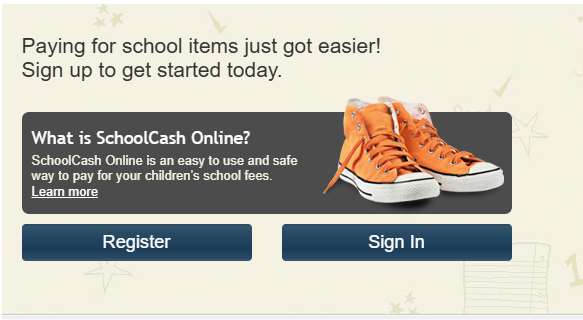
Follow these easy steps to register and get started:
- Step 1: Register
- If you have not yet registered for School Cash Online, please visit the website School Cash Online and click “Register.”
- Complete each of the three Registration Steps.
*For security reasons your password requires 8 characters, one uppercase letter, one lowercase letter and a number.
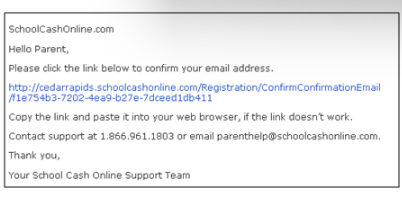
- Step 2: Confirmation Email
A registration confirmation email will be automatically forwarded to you. Click on the link provided inside the email to confirm your email and School Cash Online account. The confirmation link will open the School Cash Online site prompting you to sign into your account. Use your email address and password just created with your account.
- Step 3: Find Student
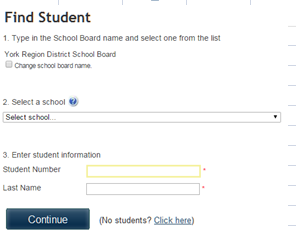
NOTE: A STUDENT NUMBER IS REQUIRED
This step will connect your children to your account.
- Enter the school board name.
- Enter the school name.
- Enter your child’s student # and last name.
- Select Continue.
- On the next page confirm that you are related to the child, check the Agree box and select Continue.
- Your child has been added to your account.
- Step 4: View Items or Add Another Student
If you have more children, select the “Add Another Student” option and repeat the steps above. 5 children can be added to one parent account. If you do not wish to add additional children, select the “View Items For Students” option. A listing of available items for purchase will be displayed.
- NEED HELP?
If you require assistance, select the GET HELP option in the top right hand corner of the screen or contact School Cash Online – Parent Help Desk at 1-866-961-1803 or parenthelp@schoolcashonline.com.
STEM Certificate
The Thornlea STEM Certificate program began officially in September 2025. Students participating in STEM will be offered opportunities such as the following:
- Canadian Senior and Intermediate Mathematics Contests
- Euclid Math Contest
- Pascal, Cayley, and Fermat Math Contests
- Fryer, Galois, and Hypatia Math Contests
- Beaver Computing Challenge
- Sir Isaac Newton Physics Exam
- Biology Contest
- STEM Research Competition
- LSF Climate Action Youth Forum
- Envirothon
- Skills Ontario Competitions
- AP Exams
- Robotics
- Chemistry Club
- Math Competition Club
- Eco Team
- Announcements Team
- Multimedia Club
This certificate is available to students in all pathways and would be granted upon graduation.
To earn this certification, students will complete a combination of academic coursework and participate in a variety of STEM clubs, contests, and community work.
For the complete list of Thornlea STEM Certificate criteria, please click here.
This opportunity will be open to students entering grade 9 in the 2026/27 school year.
Please click here to complete an expression of interest.
Families will be notified as of September 2026 that their STEM Certificate registration has been confirmed.
If you have questions, please contact us at thornlea.ss@yrdsb.ca.
Absences from School and School Year Calendar
If students are going to be absent, a parent/guardian must inform the school. You can call 905 889-9696 and press 1 for Attendance or email: thornleass.attendance@yrdsb.ca. If a student will not be returning to school on the first day or within the first 15 days of the school year, parents must complete a “Notification of Expected Return to School Form.” Please call or email us if you require this form.
Signing a student out of class due to an appointment: Please contact the office directly if your child needs to miss a period or part of the school day to attend an appointment (e.g. medical or dental). When a student is “signed out” from the main office, it is understood that they are leaving school property to attend an appointment as per the parent’s direct instructions. Parents/guardians may NOT sign a student out of a period to prepare for a test/task in another period. Students enrolled in classes must be in those classes for the full day in order to ensure supervision. Grade 12 students may attend the library for quiet study during their spare period.
Students must attend their exams. Please plan vacations during official school breaks. The YRDSB school calendar can be found here.
Driving, Parking, and Pick-up/Drop-off
To avoid the morning rush, consider dropping your child off by 8:30 AM, carpooling, or encouraging your child to walk or make use of public transit. There is no parking or stopping in the loop off Bayview. Please be mindful of one way entrance and exit driveways off Bayview. Only quick pick-up or drop-off is allowed in front of the school on Bayview - extended parking/idling is not permitted in this area. Please follow direction symbols in the north parking lot.
The transit routes servicing Thornlea Secondary School can be found at York Region Transit - School Routes.
To promote school zone safety, we will begin the year with a safety campaign which will include information on parking passes, traffic regulations, and active travel.
A limited number of student parking passes will be granted to grade 12 students who apply starting in September. All authorized students and staff will receive a colour-coded parking pass which must be displayed at all times during the school year. Thornlea students and staff must park in school designated areas which do NOT include those spaces assigned to Thornlea Pool as per signage.
Code of Conduct
Administration will be conducting assemblies to outline school expectations in the month of September. Students are expected to review the YRDSB Code of Conduct and abide by the rules and procedures outlined.
Grade 9 Orientation and Grade 9 Parent Orientation
Tuesday, September 8, 2026 is the first day of school for all Grade 9 and new International students. All grade 9 students are asked to be at school by 8:40am to begin their Orientation Day of activities. Lunch will provided to students.
We also invite families to join Mr. Belmonte (our Principal) for a welcome/question and answer session to Thornlea overview starting at 8:45am.
A complete schedule will be sent out to all grade 9 families at the end of August. Additionally, all incoming grade 9 students will be sent their timetable directly to their GAPPS email, or if not a current YRDSB student, to their parent/guardian email.
Welcome to Thornlea!
We have started a Youtube channel and our first video details what makes Thornlea great! We invite you to view the video which includes aspects of our academics, programs, certifications and extra-curriculars. The video can be accessed through the link below.